This site uses cookies to provide you with a great user experience. By visiting monetamarkets.com, you accept our cookie policy.
Allow all
This site uses cookies to provide you with a great user experience. By visiting monetamarkets.com, you accept our cookie policy.
Allow all
This website is operated by Moneta Markets Ltd, which is not authorised or regulated by the UK Financial Conduct Authority (FCA) and does not offer or promote services to UK residents. Access to this website is restricted in the UK and the content is not intended for distribution to, or use by, any person located in the UK. If you believe you have reached this website in error, please exit the page now

Please note that Moneta Markets operates this website and its services are not directed at residents of your jurisdiction.
The information on this site is not intended for distribution to, or use by, any person in any country or jurisdiction where such distribution or use would be contrary to local law or regulation.
If you have arrived here in error, we kindly advise you to exit the site.
Continue to Site

 English

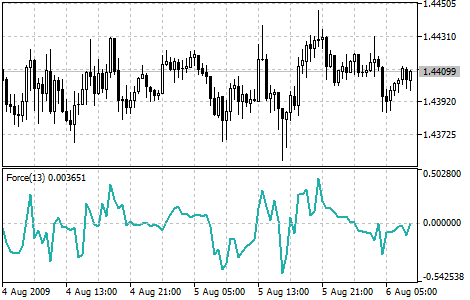
The Force Index is a technical analysis indicator that uses price and volume to measure the strength of a trend. It is calculated by multiplying the direction of a price move (up or down) by the volume associated with that move. The resulting value, known as the Force Index, is then plotted on a chart to help traders identify potential trend changes and other important market information.
Traders typically use the Force Index to confirm the strength of a trend and to identify potential trend changes. For example, a rising Force Index may indicate that a trend is gaining strength and that further upside is likely, while a falling Force Index may suggest that the trend is losing momentum and that a reversal could be imminent. Traders can also use the Force Index to identify potential buying and selling opportunities based on the strength of the underlying trend.
To add the Force Index to a chart in MetaTrader 4 (MT4) or MetaTrader 5 (MT5), follow these steps: